 minute read
Update Smart Hub Firmware
Mobile Access Management supports updating the following Smart Hub firmware:
Cambrionix Firmware for Datamation Products
-
The supported file format for Cambrionix firmware is
.enfir. -
As of March 2025, Imprivata supports the Datamation firmware version 1.89.3.
Bretford Firmware
The unified .bfw file labeled version 1.1 can update both Power Pro Gen 2.0 and PowerSync Pro Gen 2.5 models.
Obtaining the Firmware
The Smart Hub firmware for Bretford and Datamation is available for download from the Imprivata Customer Experience Center.
To obtain the Smart Hub firmware:
-
Log in to the Imprivata Customer Experience Center.
-
From the Product Downloads page, select Mobile. From the Mobile Downloads list, select Mobile Access Management.
-
In the Downloads section, click either the Bretford Firmware or Datamation Firmware link to download the firmware.
Updating the Firmware
To update the firmware on your Smart Hub, upload the downloaded firmware package or select a firmware version already in your assets. Then update the selected Smart Hub.
-
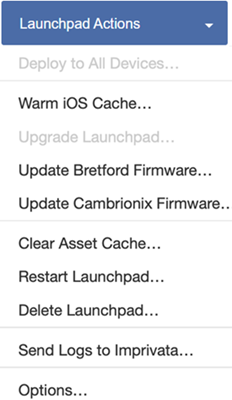
In the Launchpad Actions menu, select Update <vendor> Firmware.
Click to enlarge
-
In the Update Firmware dialog, either upload a firmware package, or select a firmware version already in your assets.
-
To upload a firmware package, click Upload New and select the appropriate file location.
-
To select an existing firmware version, select it from the firmware version list.
-
Click Update. The Launchpad Details page displays the status of the firmware update.


